
If your calendar is full of meetings that start late, wander, and end without a decision, the defaults are usually to blame: meetings called to share information that could be read, agendas that name a topic instead of an outcome, and calendars with no gaps between calls.
A short sequence, applied this week, handles most of it. Triage whether a meeting should exist, require an agenda with one goal, timebox it, run it with a visible timer and a parking lot, and change one calendar setting so buffers happen automatically.
Why bad meetings cost more than their hour
Meeting load alone is not the whole story. A 2006 study by Steven Rogelberg and colleagues linked heavy meeting demands to lower well-being, with the strongest effect when people rated their meetings as ineffective. Fewer meetings help, but better meetings help too.
The other cost is fragmentation. Paul Graham’s essay “Maker’s Schedule, Manager’s Schedule” argues that a single meeting in the middle of an afternoon can break it into pieces too small for hard work.
Before changing anything, name your main symptom:
- Too many meetings: start with triage and the audit (steps 1 and 2).
- Meetings that wander or overrun: fix the agenda and facilitation (steps 3 to 5).
- No breathing room between calls: change your calendar defaults (step 6).
Step 1: Decide whether it should be a meeting at all
A live meeting earns its place for three reasons: to decide, to create or to connect. Deciding means information was shared beforehand and the group needs to debate and commit. Creating covers brainstorms and planning workshops; connecting covers rapport, conflict and morale.
Notice what is missing: informing. A meeting is a slow way to move information in one direction, because everyone must absorb it at the same pace at the same time. Status updates, announcements and finished data belong in a written update, a short recorded video or a shared document, a trade-off covered in depth in our guide to synchronous vs. asynchronous communication.
| Meeting purpose | Verdict | Recommended format | Max live duration |
|---|---|---|---|
| Status update | Async | Written update in the project tool or team channel; a short screen recording (Loom or similar) if a demo helps | None; a 5-minute read |
| Announcement or one-way information | Async | Email or shared doc with a comment thread for questions | None |
| Brainstorm | Sync, with async prep | Silent idea generation in a shared doc first, then a live session to cluster and vote | 45 min |
| Decision | Sync, after a pre-read | One-page options memo sent 24 hours ahead; meeting used only for debate and commitment | 25 to 50 min |
| 1-on-1 | Sync | Video or in person, with a running shared agenda both people add to | 25 min weekly or 50 min fortnightly |
| Conflict or sensitive feedback | Sync | Video or in person, never text | 25 min |
If it passes triage, check the guest list. Invite the person with decision authority, people whose input changes the outcome, and anyone holding information no one else has. Everyone else gets the notes.

Step 2: Audit the meetings you already have
New invites are only half the load; recurring meetings quietly outlive their purpose. Pull the last two to four weeks of your calendar and list every meeting with its purpose, attendees and a value rating from 1 (useless) to 5 (essential). A full time audit goes further, but meetings alone usually reveal the pattern.
Then act on each recurring item:
- Cut anything rated 1 or 2 that exists to inform, and replace it with a written update.
- Shrink meetings that routinely end early. A weekly hour-long sync that wraps at 30 minutes because updates already live in the project tool should be booked as 25.
- Merge meetings with the same attendees and overlapping topics.
- Space out weekly meetings that often have little to discuss by moving them to every other week.
Step 3: Ask for an agenda before you accept
Adopt one personal policy: no agenda, no attendance. Without an agenda a meeting is a conversation, and conversations wander; with one, you can prepare, and the organiser has to think through the purpose before claiming six people’s time.
Ask helpfully rather than confrontationally. This reply works for most invites:
“Thanks for the invite. To help me prepare and contribute, could you add a short agenda with the goal and main topics to the invite?”
For a recurring meeting that has lost its point: “I want to make sure I’m still adding value here. Could we revisit the main goal of this meeting next session?” Often the organiser adds an agenda; sometimes they realise the meeting is unnecessary. If you still need to decline, our guide to saying no to protect your time and energy has more scripts.
Step 4: Write the agenda as one goal, three topics, five outputs
An agenda that reads “Budget, Timeline, Marketing” invites rambling. Constrain it instead:
- One goal, written as an outcome with a verb: “Decide on the Q3 campaign theme,” not “Discuss marketing.”
- Three topics at most, each serving the goal, each with a timebox.
- Up to five outputs: the decisions, owners and documents that must exist when the meeting ends.
Here is a launch-plan agenda built that way for a 50-minute slot:
- Goal: Approve the launch plan and make a go/no-go call on the current date.
- Topics: approve the final budget allocation (15 min); confirm marketing milestones and owner (10 min); identify remaining blockers and assign owners (20 min).
- Outputs: budget approval recorded; marketing lead named; blocker list with an owner for each; go/no-go decision.
The timeboxes do the real work because they signal depth. Fifteen minutes on the budget means a final review, not a line-by-line rebuild, which is timeboxing applied to a group.
Paste the full agenda into the invite description, give the event a verb-first title such as “DECIDE: Q3 campaign theme”, and attach any pre-reading at least 24 hours ahead with a note that the meeting assumes it has been read. If you cannot fill in the goal or the outputs, the meeting isn’t ready: cancel it and do the pre-work first.
Step 5: Run it with roles, a visible timer and a parking lot
Three roles keep a meeting on track: a facilitator who moves through the agenda, a timekeeper who flags when a timebox is ending, and a note-taker who records decisions, owners and deadlines. In small meetings one person can hold two roles, and rotating them spreads the skill.
Start at the scheduled time even if people are missing, because waiting rewards lateness. Put a countdown on screen for each topic; when it hits zero, the facilitator isn’t being rude by moving on, just honouring a limit everyone could see.
For valuable tangents, keep a parking lot: a section of the shared notes where off-topic ideas are captured for later. The redirect sounds like this: “Good point, and it deserves proper time. I’m adding it to the parking lot so we don’t lose it, and we’ll pick it up after today’s topics.”

If one person derails every week, follow up privately rather than in front of the group: “You raise a lot of good ideas outside our agenda. Where would be a better place for us to capture those?”
On video calls, make cameras optional for routine meetings. A field experiment by Kristen Shockley and colleagues linked camera use in virtual meetings to higher daily fatigue and lower participation. Close by sending notes within the hour, listing each decision and each action with an owner and a deadline.
Step 6: Change one calendar setting so buffers are automatic
Back-to-back calls carry a hidden cost. Sophie Leroy’s research on attention residue shows that when you switch tasks, part of your attention stays on the previous one, especially if it ended unfinished, and performance on the next task suffers. A five- or ten-minute gap gives you time to write down outcomes and close the loop.
| App | Where the setting lives | What it does |
|---|---|---|
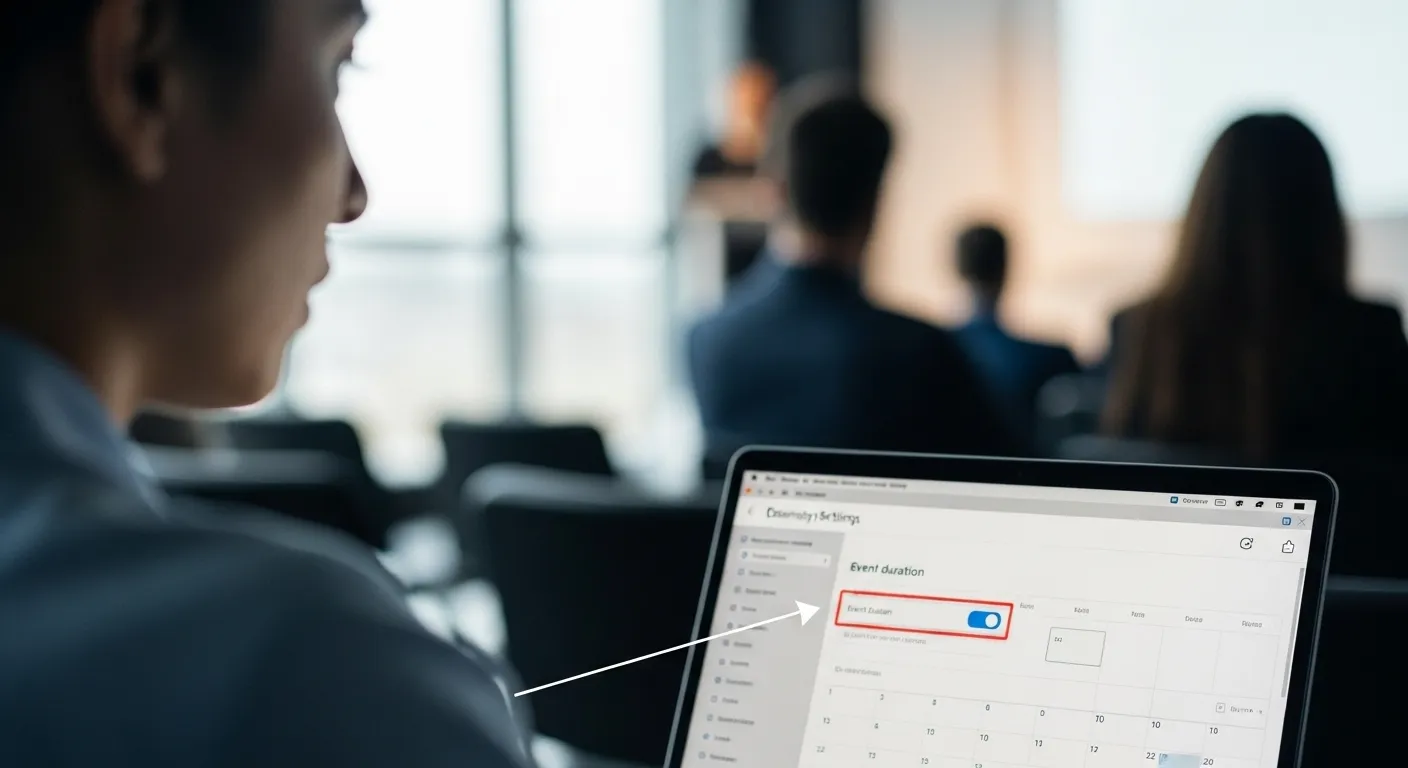
| Google Calendar (web) | Gear icon > Settings > General > Event settings > tick “Speedy meetings” | New 30-minute events end at 25 minutes and hour-long events at 50 |
| Outlook (classic desktop) | File > Options > Calendar > tick “End appointments and meetings early” | Set minutes to trim from meetings under an hour and from longer ones; 5 and 10 work well |
| New Outlook and Outlook on the web | Settings > Calendar > Events and invitations > “Shorten duration for all events” | Ends events early or starts them late by the minutes you choose |
These settings only shape events you create, so ask the people who organise most of your meetings to switch them on too. Then protect the time around your most important calls: for a critical 11:00 review, block 10:30 to 11:00 to prepare and 12:00 to 12:15 to record decisions and send actions.
At team level, consider meeting-free days. Research by Benjamin Laker and colleagues across 76 companies found productivity and satisfaction rose after companies introduced meeting-free days, though the findings rest largely on employee surveys. Even a protected half-day gives makers the uninterrupted stretch Graham describes.
Two recurring meetings, rebuilt
A manager with a team of eight runs a 60-minute Monday “Team Sync” that opens with “So, what’s on everyone’s mind?” and drifts into one-on-one status updates while six people wait. Renamed “Weekly Priorities and Blockers”, it gets a fixed agenda: one win from last week each (5 min), each person’s top one to three priorities (15 min), and an open floor for blockers with help assigned (5 min).
It now fits a 25-minute slot, returning 35 minutes to each of nine people every week, more than five person-hours.
A freelance CRM implementation specialist finds 30-minute client check-ins stretching into an hour of new configuration requests. The confirmation email now carries an agenda: goal, feedback on the configured sales pipeline; topics, a lead-to-deal walkthrough (10 min), mobile app view check (5 min) and sales dashboard Q&A (10 min); outputs, a written feedback list and sign-off on the current pipeline stages.
When the client suggests adding a marketing automation integration, it goes in the parking lot for the next scoping conversation. The specialist leaves with documented feedback for the current configuration phase instead of a dozen undocumented requests.
Keeping your meeting load from creeping back
- Re-audit recurring meetings every quarter. Purposes expire faster than calendar series do.
- Trim guest lists as they drift. Recurring invites accumulate attendees; move anyone who only needs the outcome to the notes.
- Adapt the structure for creative sessions rather than dropping it. A brainstorm still gets a goal (“20 feature ideas”) and timeboxes for silent generation, clustering and dot-voting; our guide to quick brainstorming sessions covers the format.
- Treat the rules as guardrails. Don’t refuse a meeting because its agenda has four topics instead of three; the aim is less friction, not more.
Start small: switch on the buffer setting today, send the agenda request on your next vague invite, and rebuild one meeting you organise this week.




1 Comment